
I wrote in my previous blog post that using NixOS to manage servers instead of tooling like Ansible feels like leaving Plato's cave and seeing the sun for the first time.
Now I realize that making such a statement without actually showing a NixOS server configuration is quite the reach, so I'm rectifying that by making this my second post on the blog.
In this post I plan on showing how incredibly easy it is to get a working and useful server configuration using just a few lines of Nix code.
A clean start
We start our journey with the humble flake.nix, the entry point to our configuration and since we are working with a very tiny example configuration it will be the only file in this guide!
Wow just one file for an entire guide? How efficient!
I know right?! And in our case, by the end of the post, said file will look like this:
{
  description = "It hardly gets smaller than this";

  inputs = {
    nixpkgs.url = "github:nixos/nixpkgs?ref=nixos-unstable";
  };

  outputs = {nixpkgs, ...}: {
    nixosConfigurations.server = nixpkgs.lib.nixosSystem {
      system = "x86_64-linux";
      modules = [
        ({...}: {
          # mkpasswd hunter2
          users.users.root.initialHashedPassword = "$6$...FsMn0";

          services.postgresql = {
            enable = true;
            ensureDatabases = [ "nextcloud" ];
            ensureUsers = [
              {
                name = "nextcloud";
                ensureDBOwnership = true;
              }
            ];
          };

          networking.firewall.allowedTCPPorts = [5432];

          system.stateVersion = "25.05";
        })
      ];
    };
  };
}
The flake above is enough to build and deploy a virtual machine with an up-and-ready PostgreSQL DB + user and db.
Now let's go through the building blocks out of which the `flake.nix` file above is constructed one by one.
The shell
In the outermost layer we have the following simple base structure:
{
  description = "It hardly gets smaller than this";

  inputs = {
  };

  outputs = {}: {
  };

}
This is the core structure of any nix flake, be it for packaging a program, development environment or (as is our case) the configuration for an entire virtual machine.
We have a set of inputs, often in the form of git repositories and a set of outputs.
But what do we want to input into our flake?
Good question, basically anything external we want to make use of in our configuration, like say for example, the entire nixpkgs package repository.
After all we'll need a lot of different applications to get our system into the desired state and there is no way we are going to package all those applications ourselves.
There will come a point in time when we do need to package an application ourselves but I'll leave that to a future blog post so as not to overcomplicate things here ;)
So we import nixpkgs and reach this point in the config:
{
  description = "It hardly gets smaller than this";

  inputs = {
    nixpkgs.url = "github:nixos/nixpkgs?ref=nixos-unstable";
  };

  outputs = {nixpkgs, ...}: {
  };

}
You'll note that two things have changed.
- There is now a new entry in our inputs that specifies nixpkgs as an input and sets the git URL where it can be fetched from
- We now import the nixpkgs into our outputs function so that we can make use of it in our config
The juicy bit inside the shell
I know you are just itching to put our first and only dependency to use so let me indulge you by making use of one of the library functions in nixpkgs, the mighty lib.nixosSystem :
outputs = {nixpkgs, ...}: {
  nixosConfigurations.server = nixpkgs.lib.nixosSystem {
    # Can be also be "aarch64-linux", "i686-linux" or "riscv64-linux"
    system = "x86_64-linux";
    modules = [];
  };
};
This library function allows us to define a NixOS system that can then be built and deployed, and the only things we have to define is the system architecture and a set of modules that define the system state.
But what sort of system state would we want to define?
Another good question, you're on a roll.
How about setting the root users password:
users.users.root.initialHashedPassword = "$6$BFwNq...koM23KkhhFsMn0";
Or enabling the PostgreSQL instance I mentioned earlier, perhaps even with a Nextcloud database and user pre-setup for our convenience:
services.postgresql = {
  enable = true;
  ensureDatabases = ["nextcloud"]; # Create nextcloud db
  ensureUsers = [
    {
      name = "nextcloud"; # Create nexcloud user
      ensureDBOwnership = true; # and give him access to the db by the same name
    }
  ];
};
Or maybe opening some ports so said PostgreSQL instance can actually be reached by outside services:
networking.firewall.allowedTCPPorts = [5432];All together our output set should now look like this:
outputs = {nixpkgs, ...}: {
    nixosConfigurations.server = nixpkgs.lib.nixosSystem {
      system = "x86_64-linux";
      modules = [
        ({...}: {
          users.users.root.initialHashedPassword = "$6$B...Mn0";

          services.postgresql = {
            enable = true;
            ensureDatabases = ["nextcloud"];
            ensureUsers = [
              {
                name = "nextcloud";
                ensureDBOwnership = true;
              }
            ];
          };

          networking.firewall.allowedTCPPorts = [5432];

          system.stateVersion = "25.05";
        })
      ];
    };
  };
Now we have our system configuration done in just 13 lines!
Just imagine how much clickbaitier I could have made the title if I hadn't counted boilerplate and empty lines!
Actually running our machine
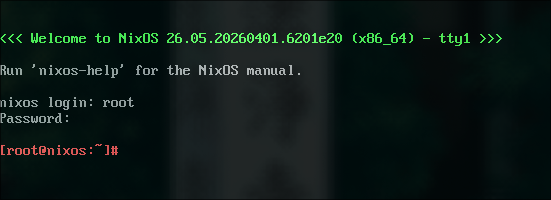
Now comes the cool part, Nix actually allows us to take a configuration, build a qemu VM from it and run it in just two commands. So that's exactly what we are going to do!
First we tell nix to build our configuration as a VM image:
nix build .#nixosConfigurations.server.config.system.build.vmThen we run it:
./result/bin/run-nixos-vmAnd boom:
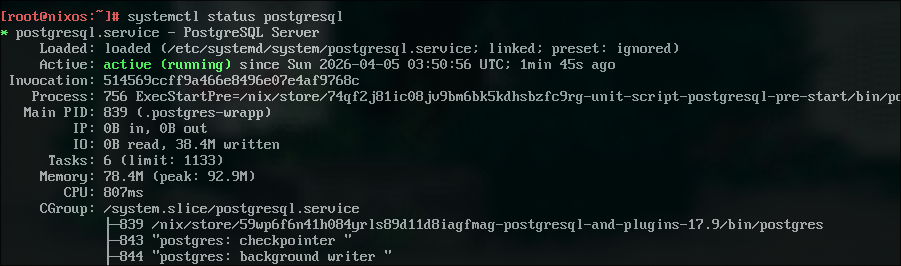
We can now run systemctl status postgresql and we'll be greeted with this:
Now if this makes your thoughts race at the possibilities this unlocks, and makes you salivate at the ease with which you just setup an entire system... then I'm afraid you too are a nerd.
Nice to have you around ;)
The part where I admit to cheating a little
Okay, I have to come clean.
This doesn't just run in a VM; it only runs in a VM.
If we want to deploy this to a dedicated server and not just qemu, we will need to give NixOS a little more information on how we want our system set up.
Specifically we need to tell it what bootloader to use and what disk to install the system on.
Which looks like this:
boot.loader.grub.enable = true;
boot.loader.grub.device = "/dev/sda";

fileSystems."/" = {
  device = "/dev/sda1";
  fsType = "ext4";
};/dev/sdais a common disk path but it might differ for your specific system, double check it withlsblk
Once this is done you can activate the configuration on your NixOS system by running:
sudo nixos-rebuild switch --flake .#serverAnd voila, your system should be up and ready for use!
But ozoromo! My server doesn't have NixOS installed and my cloud provider doesn't offer it as an image!
How am I supposed to auto format a generic Debian server, install NixOS and activate my configuration on the remote system with a single command?
That's an oddly specific question but you're in luck, there is tooling out there that makes doing exactly that a breeze!
And luckily I plan on making my next blog post about just that, so if you're interested feel free to subscribe with the button below!
That one line I haven't talked about yet
The astute observer might have noticed the one line in the configuration I haven't talked about yet:
system.stateVersion = "25.05";This is a value that once set should never be changed as it tells NixOS what version to use for setting and reading the internal system state.
In short: This value is used for backward compatibility and should never be changed for any reason, if you find yourself thinking about changing it, think again.
For the copy-pasters among you
Here's the full flake.nix file:
 262588213843476